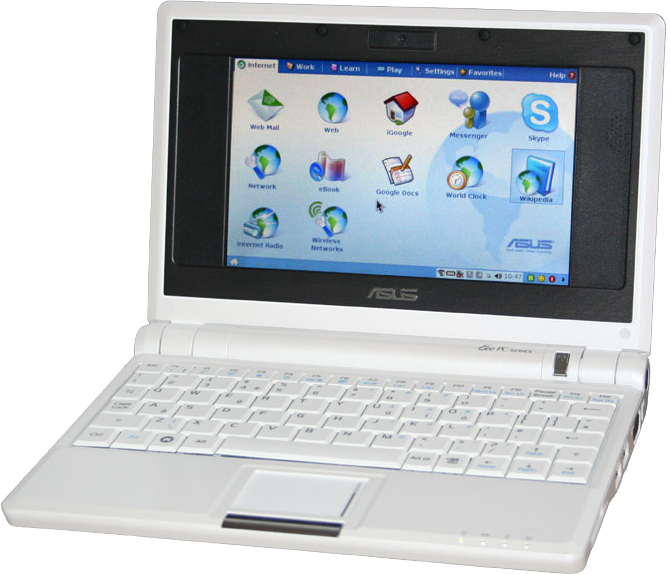
ASUS Eee PC is a series of ultraportable laptops , netbooks (there are also tablets from ASUS Eee series), originally developed by Intel and ASUSTeK (often simply called Asus) and aimed at the consumer (non-specialized) market. According to ASUSTeK, three “E” stands for “ Easy to learn, Easy to play and Easy to work. "," Easy to learn, easy to play, easy to work. "
| Eee pc | |
|---|---|
 | |
| Type of | netbook |
| Date of issue | October 16, 2007 |
| Produced by | January 2013 |
| CPU | Intel Celeron M 900 MHz Intel Atom N270 (1.6 GHz) / N280 (1.66 GHz) / 330 (1.6 GHz) / N450 (1.66 GHz) / D525 (1.8 GHz) |
| RAM | 256/512/1024/2048/4096 DDR2 / DDR3 -400 |
| Chipset | Intel 910GML / Intel 945GSE + ICH7-M |
| Data storage devices | 2/4/8/12/20/40 GB flash drive 80/160/250/320/500/750 GB Hard Drive |
| OS | proprietary, based on Xandros ( GNU / Linux ), or Ubuntu , or Windows XP or Windows 7 (from Home to Home advanced) |
| Website | outdated link not working |
The plans for two models, 701 and 1001, were announced at COMPUTEX Taipei 2007. The first one began on October 16th.
Asus had plans to sell 200,000 cars by the end of 2007, from 300,000 to 500,000 in 2008 and 3-5 million by 2009. Intel, for its part, sees Eee as continuing its own World Ahead initiative, which aims to the availability of a personal computer for every inhabitant of the planet.
Eee PC netbooks are significantly smaller and more affordable than traditional laptops. In part, the release of this series was a response to the development of the cheaper XO-1 laptop under the One Laptop per Child (OLPC) project.
At the time of 2012, the Eee PC series netbooks were available with 10 and 12 inch screens based on hardware from both Intel and AMD ( AMD Brazos APUs).
In January 2013, Asus officially discontinued the Eee PC series of laptops due to lower sales, which was a result of a shift in consumer preferences towards tablets and ultrabooks . [1] [2]
Content
- 1 Design
- 1.1 Display
- 1.2 Software
- 1.2.1 Delivery with Xandros
- 1.2.2 Delivery with Windows XP
- 1.2.3 Alternative OS
- 1.3 Memory
- 2 Marketing
- 3 Disadvantages of a netbook
- 4 advantages of a netbook
- 5 Specifications
- 6 notes
- 7 See also
- 8 References
- 8.1 Official
- 8.2 Other
- 8.3 Change OS on ASUS EeePC
Design
In terms of size, the EeePC 701 is roughly equivalent to a subnotebook; its dimensions: 225 × 165 × 21 ~ 35 mm, weight - 920 grams. The interface can switch to simplified and fully functional modes. [ specify ]
Display
The screen resolution of the 700th series is 800 × 480 pixels with a diagonal of 7 inches. The screen is so small that it does not occupy the entire top cover: there is space for speakers and an optional webcam - this was done to minimize the cost of the laptop. In the 900th series, the screen has a diagonal of 8.9 inches with a resolution of 1024x600 and takes up almost all the space, the speakers are moved to the main body. The screen uses LED backlight.
Software
Eee PCs come preloaded with Xandros OS ( GNU / Linux based OS ), Windows XP or Windows 7 , but installing another OS is straightforward.
Delivery with Xandros
The Xandros version for the Eee PC has been specially developed in order to meet the requirements of a typical user and at the same time not take up much space on the laptop drive. Download after switching on is relatively quick (it takes about 20 seconds to download), which makes the computer look like a PDA and cell phones.
The user interface is based on the IceWM window manager and a special panel environment . The kit comes with OpenOffice.org , Mozilla Firefox , Skype , Mozilla Thunderbird , a program for listening to Internet radio, links to Google Docs and Wikipedia .
Eee PC with Xandros preinstalled also includes drivers for Windows XP.
Delivery with Windows XP
EeePC with Windows XP (Home Edition) preinstalled includes Microsoft Works and Windows Live Suite .
Alternative OSs
It is possible to use one of the common OSs as an alternative OS for the Eee PC, but it should be noted that a number of OSs do not support all the functions of the laptop hardware:
- Linux OS: Xandros , Ubuntu ( Eeebuntu ), Fedora , Debian , Mandriva , Arch Linux , Android , etc.
- OS based on BSD : NetBSD 4.0 and higher, FreeBSD , OpenBSD 4.4
- Opensolaris
- Windows FLP , Windows Vista
- Haiku
- Syllable , Mac OS X
Memory
For data storage, a solid state drive ( SSD) is often used rather than a hard drive , which reduces energy consumption, speeds up loading and makes the device insensitive to mechanical stress. But there are models with a hard drive, usually from 160 to 500 GB.
RAM can have a capacity of 512 to 2048 MB .
Marketing
Eee does not seek to compete with the OLPC XO-1, aimed at a specific educational segment. On the contrary, Eee is accessible to a wide range of consumers and is aimed at users who need a compact, cheap device.
Netbook Weaknesses
- Due to hardware miscalculations of the developers, the battery of the Asus Eee PC 701 and Asus Eee PC 900 discharges when the netbook is turned off.
- On the Asus Eee PC 701, the pre-installed OS takes up most of the available space on the disk, leaving the user only a little more than 1 GB, and the use of additional drives increases the cost of the device, discounting the advantage of the original low cost. For example, on the Eee PC 900 model, in addition to the main 4GB, 8GB (with preinstalled Windows XP OS) or 16GB (with preinstalled Linux Xandros OS) added. But cleaning the operating system makes about 2.4 gigabytes available while maintaining functionality.
- The problem of lack of space on the internal drive is partially solved by removing some pre-installed programs (Microsoft Works, Windows Live, Adobe Reader) and using alternative programs of the portable version, launched from the SD card or installed on it.
- Asus Eee PC 900 16G has one slow SSD card, which reduces performance. Versions with 12 and 20 gigabytes have 4 gigabytes of fast SSD (for the system).
- Asus Eee PC 701 screen resolution is another cause for concern. Most modern sites are not designed for a screen width of only 800 points, so the browser user will be forced to constantly scroll their contents in the horizontal direction (however, when using the Opera browser, this problem does not occur with standard resolution), and when installing additional software, the “yes” button "," No "," cancel "often find themselves under the bottom edge of the screen (since the height of the window with these buttons most often has a fixed size of 600 pixels), and so you have to poke at random, trying to “touch” these buttons. On models 900 and higher, a screen resolution of 1024 × 600 and higher. As a result, this problem disappears.
- This problem is partially resolved by the fact that the video driver has a “800 × 600 with scrolling” mode, which you can temporarily switch to. It is also possible to install alternative drivers and utilities that allow you to increase the virtual screen resolution to 1024 × 768 (as an example, you can use AsTray +).
- In the models of the 900 and 700 series, the keys on the keyboard are extremely small, due to which many will have to get used to the keyboard, and the rest simply will not be able to quickly type text on it (a drawback of any netbook of this format).
- In many games, instead of Russian P, L is written on the keyboard (there are two of them, as it were).
- A solid state flash drive has a shorter lifespan compared to classic hard drives .
- The serial number sticker is quickly erased. This may void the warranty.
- There is no familiar LED displaying the status of CapsLock (which, however, is compensated by utilities that display the CapsLock indicator next to the keyboard layout indicator).
- This issue was resolved in the Eee PC 1000 Series.
- Due to the low quality and tendency to dry thermal paste between the heat pipe of the cooling radiator and the processor and graphic chip that are cooled by the netbook, after some time (1-1.5 years) it becomes prone to spontaneous shutdown due to overheating of components.
Netbook Advantages
- The lack of a fragile hard drive - allows you to intensively use the laptop on the go or in transport.
- The small volume of the NAND flash drive made it possible to lower the price, and, formally, for a system such as Windows XP , 4 GB (in the version officially delivered to Russia) was enough.
- Wi-Fi allows you to quickly transfer data, including in computer-to-computer mode (without the participation of an access point), which allows you to use any network drives.
- The memory card slot supports the SDHC standard, so the total amount of built-in media can be increased by 32 GB.
- The Cyrillic characters of the keyboard are colored in green, and the additional ones in blue, unlike red, they are better visible in low light conditions.
- The use of high-quality materials in the assembly, as well as the high quality of the assembly itself.
- Cheap in comparison with other ultraportable laptops (Sony TZ, HP, Lenovo: from ~ 60 tons) - the price is even 10 tons. very small.
- The ultra-fast start time of the Linux version of EeePC (for example, model 901) due to the use of the Atom 1.6 GHz processor and SSD HDD is only 15-20 seconds and it is ready to work.
Specifications
| Components | Eee PC 2G Surf (700) | Eee PC 4G Surf (701) | Eee PC 4G (701) 1 | Eee PC 8G (701) | Eee PC 900 | Eee PC 901 | Eee PC 1000 | Eee PC 1000H | Eee PC 1201HA | Eee PC 1201N |
|---|---|---|---|---|---|---|---|---|---|---|
| Display | 7 " LED backlit LCD monitor [3] | 8.9 "LCD Monitor | 10.2 "LCD Monitor | 12.1 "LCD Monitor | ||||||
| resolution 800 × 480 [3] | resolution 1024 × 600 | resolution 1366 × 768 | ||||||||
| Video | Integrated Intel GMA 900 graphics card ( Shared Memory Architecture ). There is an additional D-Sub connector, allowing you to connect an external monitor with a resolution of up to 1600 × 1280 [4] | Integrated Intel GMA 950 Graphics Card | NVIDIA ION Integrated Graphics Card | |||||||
| Storage device | 2 GB solid state drive (SSD) | 4 GB SSD | 8 GB SSD | Two 4 GB and 8 GB SSDs (with preinstalled Windows XP OS ), either 4 GB + 16 GB (with preinstalled Linux OS), or one slow 16 GB SSD | 40 GB SSD | 80 GB HDD | 250/320 GB HDD | |||
| CPU | 800 MHz Intel Celeron_M ULV [5] , operating at a frequency of 571 MHz. | 900 MHz Intel Celeron_M ULV 353 [5] , operating at a frequency of 630 MHz | 900 MHz Intel Celeron_M ULV 353 [5] | 1.6 GHz Intel Atom N270 | 1.33 GHz Intel Atom Z520 | 1.66 GHz Intel Atom 330 | ||||
| L2 cache | No | 512 KB [6] [7] | 512 kb | 1 MB | ||||||
| RAM | 256 [8] / 512 MB [9] | 512 MB DDR2-533 / 667 [10] | 1 GB DDR2-533 / 667 | up to 2 GB of RAM | up to 3 GB of RAM | |||||
| Soldered | One slot for up to 2 GB installation | Two slots for up to 2 GB | Two slots for up to 3 GB | |||||||
| Battery | 4-cell, 4,400 mAh , 7.4 V lithium-ion battery . The declared minimum operating time on a full charge is 2 hours 45 minutes. | 4-cell, lithium-ion battery with a capacity of 5200 mAh, 7.4 V: The declared minimum operating time is 3 hours 30 minutes. However, the vast majority of copies shipped to Russia have a 4400 mAh battery. | 4-cell, lithium-ion battery, 4400 mAh and 7.4 V or 5800 mAh and 7.2 V. The declared minimum operating time is 2 hours 30 minutes [11] | 6-cell, 7.4 V lithium-ion battery, 6,600 mAh | 6 element | |||||
| Integrated webcam | No | 0.3 megapixels ; resolution up to 640 × 480; frame rate up to 30 Hz [4] | 1.3 megapixel | 0.3 megapixel | ||||||
| Prices at the time of release | 7.999 NTD [12] (about 245 USD ); US $ 299 in the USA | 9,990 NTD [12] (about 307 USD ); US $ 349.99 in the USA | 11,655 NTD including 5% tax [12] (about 357 US $ ); € 299 in Europe (about 470 USD ); 579 NZD in New Zealand (about 450 USD ); US $ 399.99 in the USA | 13,800 NTD [12] (about 425 USD ); US $ 499.99 in the USA | Hong Kong : 513 USD [13] . UK : £ 329 (approximately € 410, $ 650) including VAT USA : US $ 549 [14] [15] | 16,988 NTD ( US $ 561 / £ 319) | 19,988 NTD ( US $ 660 / £ 335) | 18,988 NTD ( US $ 627 / £ 319) | - | - |
| Dimensions | 225 × 165 × 21 ~ 35 mm [16] | 225 × 170 × 20 ~ 34 mm | 225 × 175.5 × 22.7 ~ 39 mm | 267 × 191 × 25 ~ 38 mm | 296 × 208 × 27 ~ 33 mm | 296 × 208 × 27 ~ 33 mm | ||||
| Weight | 895 g | 920 g | 990 g | 1140 g | 1330 g | 1450 g | 1380 g | 1460 g | ||
| Other |
| |||||||||
- 1 In the UK, Eee also marketed as a computer for educational purposes [22] , whose target audience was primary school students. There are no differences in configuration.
Notes
- ↑ Spurbeck, Jared . Acer and Asus to Stop Making Netbooks , Yahoo! (January 3, 2013). Date of treatment January 13, 2013.
- ↑ Condliffe, Jeff. Asus and Acer: The Netbook Is Dead . Gizmodo (January 2, 2013). Date of treatment February 13, 2013.
- ↑ 1 2 Rise in quotes for 7-inch LCD panels raised Asustek Eee PC price , DigiTimes ( 2007-10-22 ). Date of treatment October 22, 2007.
- ↑ 1 2 3 4 Freeman, John . ASUS Eee PC: Exclusive Inside Look! , TweakTown ( 2007-10-31 ). Date of treatment November 5, 2007.
- ↑ 1 2 3 EP EeePC ( Chinese ), Mobile01 ( 2007-10-18 ). Date of treatment November 16, 2007.
- ↑ Intel Celeron M 353 (unreachable link) . Intel Date of treatment November 16, 2007. Archived December 21, 2007.
- ↑ Smith, Tony . Asus launches tiny PC , The Register ( 2007-10-16 ). Date of treatment November 16, 2007.
- ↑ EeePC 2G 256MB RAM (inaccessible link) . Date of treatment August 26, 2011. Archived on September 7, 2011.
- ↑ Pictures of the Asus Eee Surf 2G (unavailable link) ( 2007-12-16 ). Date of treatment May 8, 2008. Archived on June 7, 2008.
- ↑ Confirmed by ASUS: Eee PC RAM will be Replaceable , EeeUser.com ( 2007-09-11 ). Archived December 9, 2012. Date of appeal September 12, 2007.
- ↑ ASUS replacing Eee PC 900 batteries (inaccessible link) . Engadget ( 2008-04-22 ). Date of treatment September 28, 2017. Archived September 29, 2018.
- ↑ 1 2 3 4 Asustek Eee prices leak out , The Inquirer ( 2007-10-16 ). Date of treatment October 16, 2007.
- ↑ Official release at eeepc.net
- ↑ Asus releases Eee PC900 specifications and UK prices (Guardian blogs) (Link not available) . Date of treatment May 8, 2008. Archived May 14, 2008.
- ↑ $ 549 Eee PC 900 to hit US May 12 (Computerworld.com) (link not available) . Date of treatment May 8, 2008. Archived on May 11, 2008.
- ↑ 1 2 Lemon, Sumner . First Look: Asustek's $ 199 PC , PC World ( 2007-06-06 ). Date of treatment June 28, 2007.
- ↑ Goodwins, Rupert . Ubuntu 7.10 Gibbon swings on the Asus Eee , ZDNet ( 2007-10-26 ). Date of treatment November 16, 2007.
- ↑ Breeezy based on Puppy Linux - sub-64 MB build for educational PCs Archived on October 2, 2008. at Eee User
- ↑ Holwerda, Thom . Syllable Runs on the Asus Eee PC , OSNews ( 2008-04-14 ). Date of treatment June 28, 2007.
- ↑ Asus Eee PC news photos ( Chinese ), XFastest ( 2007-10-16 ). Archived on November 9, 2007. Date of treatment October 16, 2007.
- ↑ O'Brien, Kevin . Asus Eee PC Tweak Guide , NotebookReview ( 2007-11-01 ). Date of treatment November 8, 2007.
- ↑ RM Asus miniBook unopened (inaccessible link) . Research Machines . Date of treatment November 7, 2007. Archived on October 14, 2007.
See also
- ASUS Eee Box and ASUS Eee Monitor
- Cloudbook
- Aurora - GNU / Linux distribution specifically optimized for Asus Eee PC netbooks
- Notebook XO-1
- VIA NanoBook
- Classmate pc
- Sinomanic
- Openbook
- Laptop computers
Links
Official
- Official site (Russian) ASUS Eee PC
- Specifications Sheet ASUS Eee PC
Other
- Page with a list of sites and reviews dedicated to the Asus Eee PC 701
- Eee-PC.ru Another unofficial Russian community and blog on ASUS EeePC
- EeeUsers.org Russian-speaking ASUS EeePC user club (blocked on February 9, 2015 due to hosting fees not paid)
- Asus Eee PC.ru Blog about ASUS Eee PC
- - Eee PC community of the Russian-language sector of LiveJournal
- kostika.net blog on configuring Linux on ASUS Eee PC
Change OS on ASUS EeePC
- Slackware Linux on eeePC - draft Slackware Linux on Eee PC (draft)