Windows Calendar is a personal calendar application developed by Microsoft . It offers calendar synchronization using Microsoft Exchange Server , Apple’s iCloud calendar services, Outlook.com and Google Calendar , and support for the popular format.
| Windows component | |
| Windows Calendar | |
|---|---|
 | |
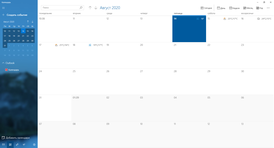 Calendar app on Windows 10 | |
| Component Type | The calendar |
| Included in | Windows Vista , Windows 8 , Windows 8.1 , Windows 10 , Windows Server 2012 and later. |
| Replaced | Windows Live Mail |
| condition | Active |
Content
- 1 History
- 1.1 Windows Vista
- 1.2 Windows 8
- 1.3 Windows 10
- 2 See also
- 3 notes
- 4 References
History
Microsoft first included the Calendar application in Windows 1.0 , which was prior to Windows 3.1 , and then was replaced by the Schedule + application in Windows for Workgroups and Windows NT 3.1. Schedule + was later transferred from Windows to Microsoft Office [1] and on Windows did not have another calendar application until Windows Calendar appeared in Windows Vista . “Windows Calendar” appeared in Windows Vista Beta 2. [2]
Windows Vista
The version supports sharing, subscribing and publishing calendars on web servers with support for WebDAV and network resources. She always supported files with the extension .ics , and the subscription allows to synchronize with Google Calendar . [3] Its interface is consistent with Windows Vista Mail, but the two applications are not connected in this operating system . You can rename the default calendar.
Windows 8
A new version of the "Calendar" with "heavy text" was added in Windows 8 as one of many Metro- applications. This is one of the three applications on Windows that were originally in Microsoft Outlook , the other two are mail and people. Structurally, the three applications are interconnected and are removed and installed together, but each has its own user interface. Calendar in Windows 8 initially supported Outlook.com, Exchange , Google Calendar, and Facebook calendars. Due to changes in the API , Facebook and Google calendars can no longer sync directly to Windows 8 . [4] As in many Windows 8 Metro applications, many functions are hidden in the "charms bar" or in the menu at the bottom of the screen, which is launched by right-clicking. Different calendars can be marked with different colors. When a user with a Microsoft account adds a calendar account to one computer with a Windows 8 calendar, the account will be automatically added to all other Windows 8 computers that the user is signed in to. The .ics format is not supported on this version of Windows .
Windows 10
The Mail application has predefined server configurations for Outlook.com, Exchange , Google Calendar, and iCloud Calendar. [5] [6] [7] Users can install it to use the system theme or select a custom color, background image, dark or light theme. The calendar application for Windows 10 has multi-window support for viewing and editing events. Different calendars can be marked with different colors, and events can be rearranged by drag and drop. The default interface is Month-View, but users can also use the Day, Week, and Year views and print these views. The application for Windows 10 also uses the pop-up settings panel and the mini-ribbon interface in the viewing area. Day of the year and calendar events are displayed on the "live tile". Like the Windows Vista version, important controls are easily visible and use icons in accordance with the OS style. Accounts can be grouped and relabeled, but folders cannot be changed from the application. Support for the .ics format appeared in Windows 10 1607 . [8]
See also
- Google calendar
Notes
- ↑ Ziff Davis Inc. PC Mag . - Ziff Davis, Inc., 1996-03-12. - 402 s.
- ↑ Windows Vista Beta 2 ( PC ) , PCMAG . Date of treatment January 2, 2018.
- ↑ Display your Google Calendar in Windows Calendar . Date of treatment January 2, 2018.
- ↑ https://support.microsoft.com/en-us/help/14091/windows-8-calendar-app-help . support.microsoft.com. Date of treatment January 2, 2018.
- ↑ Set up email in Mail for Windows 10 . Date of treatment January 2, 2018.
- ↑ How to Set Up iCloud Email and Calendars on Windows 10 . Date of treatment January 2, 2018.
- ↑ A closer look at the new Mail app on Windows 10 - MSPoweruser (English) , MSPoweruser (April 7, 2015). Date of treatment January 2, 2018.
- ↑ What's new in Mail and Calendar for Windows 10? (eng.) . Date of treatment January 2, 2018.