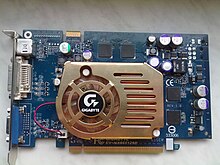

A video card (also a video adapter , graphics adapter , graphics card , graphics card , graphics accelerator ) is a device that converts a graphics image stored as the contents of the computer’s memory (or the adapter itself) into a form suitable for further display on the monitor screen . The first monitors built on cathode ray tubes operated according to the television principle of scanning the screen with an electron beam, and the video signal generated by the video card was required for display.
However, this basic function, while remaining necessary and in demand, has faded into the background, ceasing to determine the level of image formation capabilities - the quality of the video signal (image sharpness) is very little related to the price and technical level of a modern video card. First of all, now a graphic adapter is understood to mean a device with a graphic processor - a graphics accelerator, which is engaged in the formation of the graphic image itself. Modern video cards are not limited to simple image output; they have an integrated graphics processor that can perform additional processing by removing this task from the computer’s central processor . For example, all modern Nvidia and AMD ( ATi ) video cards render the OpenGL and DirectX and Vulcan graphics pipeline at the hardware level. Recently, there has also been a tendency to use the computing capabilities of the GPU to solve non-graphic tasks.
Typically, the video card is made in the form of a printed circuit board ( expansion card ) and is inserted into the expansion slot , universal or specialized ( AGP , PCI Express ). Video cards built-in (integrated) to the motherboard are also widely distributed - both as a separate chip, and as part of the north bridge of the chipset or CPU ; in this case, the device, strictly speaking, cannot be called a video card.
Creation History
One of the first graphics cards for the IBM PC was MDA (Monochrome Display Adapter) in 1981 . It worked only in text mode with a resolution of 80 × 25 characters (physically 720 × 350 pixels) and supported five text attributes: regular, bright, inverse, underlined and blinking. He could not transmit any color or graphic information, and what color the letters would be was determined by the model of the monitor used. Usually they were white, amber or emerald on a black background. In 1982, Hercules released a further development of the MDA adapter, the HGC video adapter (Hercules Graphics Controller - Hercules graphics adapter), which had a graphic resolution of 720 × 348 pixels and supported two graphic pages. But he still did not allow working with color.
The first color graphics card was CGA (Color Graphics Adapter), released by IBM and became the basis for subsequent standards for graphics cards. It could work either in text mode with resolutions of 40 × 25 familiarity and 80 × 25 familiarity (character matrix - 8 × 8), or in graphic mode with resolutions of 320 × 200 pixels or 640 × 200 pixels. In text modes, 256 symbol attributes are available - 16 symbol colors and 16 background colors (or 8 background colors and a blinking attribute), in the graphic mode 320 × 200, four palettes with four colors each were available, and the high-resolution 640 × 200 mode was monochrome. In development of this card, EGA (Enhanced Graphics Adapter) appeared - an improved graphics adapter, with an expanded palette of up to 64 colors, and an intermediate buffer. The resolution was improved to 640 × 350, as a result, a text mode of 80 × 43 was added with an 8 × 8 character matrix. For the 80 × 25 mode, a large matrix was used - 8 × 14, at the same time 16 colors could be used, the color palette was expanded to 64 colors. The graphic mode also allowed using at a resolution of 640 × 350 16 colors from a palette of 64 colors. It was compatible with CGA and MDA.
It is worth noting that the interfaces with the monitor of all these types of video adapters were digital, MDA and HGC only transmitted a dot on or off and the additional brightness signal for the text attribute was “bright”, similar to CGA on three channels (red, green, blue) transmitted the main video signal , and could additionally transmit a brightness signal (16 colors in total), EGA had two transmission lines for each of the primary colors, that is, each primary color could be displayed with full brightness, 2/3 or 1/3 of the full brightness, which gave a total of maxim m 64 colors.
In the early models of computers from IBM PS / 2 , a new graphics adapter MCGA (Multicolor Graphics Adapter - multicolor graphics adapter). The text resolution was raised to 640x400, which allowed using the 80x50 mode with an 8x8 matrix, and using the 8x16 matrix for 80x25 mode. The number of colors has been increased to 262144 (64 brightness levels for each color), for compatibility with EGA in text modes, a color table was introduced through which the 64-color EGA space was converted to the MCGA color space. The 320x200x256 mode appeared, where each pixel on the screen was encoded with the corresponding byte in the video memory, there were no bit planes, respectively, only the text modes remained compatible with EGA, the compatibility with CGA was full. Due to the huge number of brightnesses of the primary colors, it became necessary to use an analogue color signal; the horizontal frequency was already 31.5 kHz.
Then IBM went even further and made VGA (Video Graphics Array - a graphic video array), an EGA-compatible MCGA extension introduced in mid-range PS / 2 models. This is the actual standard of the video adapter since the end of the 80s. Added: text resolution 720x400 for MDA emulation and graphics mode 640x480 with access via bit planes. The 640x480 mode is remarkable in that it uses a square pixel, that is, the ratio of the number of pixels horizontally and vertically coincides with the standard aspect ratio of the screen - 4: 3. Then came the IBM 8514 / a with resolutions 640x480x256 and 1024x768x256, and the IBM XGA with text mode 132x25 (1056x400) and increased color depth (640x480x65K).
Since 1991, the concept of SVGA (Super VGA - “over” VGA) appeared - an extension of VGA with the addition of higher modes and additional service, for example, the ability to set an arbitrary frame rate. The number of simultaneously displayed colors increases to 65 536 (High Color, 16 bits) and 16 777 216 (True Color, 24 bits), additional text modes appear. From service functions, support for VBE appears (VESA BIOS Extention - VESA standard BIOS extension). SVGA is seen as the actual video adapter standard sometime since mid- 1992 , after the VESA Association adopted VBE standard version 1.0. Until that moment, almost all SVGA video adapters were incompatible with each other.
The graphical user interface , which appeared in many operating systems , stimulated a new stage in the development of video adapters. The concept of a graphics accelerator appears. These are video adapters that perform the execution of certain graphic functions at the hardware level. These functions include: moving large blocks of the image from one part of the screen to another (for example, when moving the window), filling portions of the image, drawing lines, arcs, fonts, supporting the hardware cursor, etc. Direct push to the development of such a specialized device it turned out that the graphical user interface is undoubtedly convenient, but its use requires considerable computing resources from the central processor, and the modern graphics accelerator is designed to remove the lion’s Olu calculations on the final image display.
An example of a non- IBM home computer , the ZX Spectrum , has its own history of video modes .
Device
A modern video card consists of the following parts:
- GPU
The graphics processor (Graphics processing unit (GPU) is a graphics processor) that calculates the output image, relieving the central processor of this responsibility, and makes calculations to process 3D graphics commands. It is the basis of the graphics card, it depends on it the speed and capabilities of the entire device. Modern graphics processors are not much inferior in complexity to the central processor of a computer, and often surpass it both in the number of transistors and in processing power, due to the large number of universal computing units. However, the architecture of the past generation GPU usually assumes the presence of several information processing units, namely: a 2D graphics processing unit, a 3D graphics processing unit, which, in turn, is usually divided into a geometric core (plus vertex cache) and a rasterization block (plus texture cache) and etc.
- Video controller
The video controller is responsible for the formation of the image in the video memory, gives the RAMDAC commands to generate the scan signals for the monitor and processes the requests of the central processor. In addition, an external data bus controller (e.g., PCI or AGP), an internal data bus controller, and a video memory controller are typically present. The width of the internal bus and the video memory bus is usually larger than the external (64, 128 or 256 bits versus 16 or 32); RAMDAC is also integrated into many video controllers. Modern graphics adapters (AMD, nVidia) usually have at least two video controllers that operate independently of each other and simultaneously control one or more displays each.
- Video ROM
Video ROM (Video ROM) is a read-only memory (ROM) into which the BIOS of video cards , screen fonts , service tables, etc. are written. The ROM is not used directly by the video controller - it is accessed only by the central processor.
The BIOS provides initialization and operation of the video card before loading the main operating system , sets all the low-level parameters of the video card, including operating frequencies and supply voltages of the graphics processor and video memory, memory timings. VBIOS also contains system data that can be read and interpreted by the video driver during operation (depending on the method used to share responsibility between the driver and BIOS). On many modern cards, electrically reprogrammable ROMs ( EEPROM , Flash ROM ) are installed, allowing the user to overwrite the video BIOS with a special program.
- Video RAM
Video memory performs the function of a frame buffer , which stores the image generated and constantly changed by the graphics processor and displayed on the monitor screen (or multiple monitors). Video memory also stores intermediate image elements and other data that are not visible on the screen. There are several types of video memory that differ in access speed and operating frequency. Modern video cards are equipped with memory such as DDR , GDDR2 , GDDR3 , GDDR4 , GDDR5 and HBM. It should also be borne in mind that, in addition to the video memory located on the video card, modern graphic processors usually use part of the general system memory of the computer, direct access to which is organized by the video adapter driver via the AGP or PCIE bus. If the Uniform Memory Access architecture is used, part of the system memory of the computer is used as video memory.
- RAMDAC and TMDS
Digital-to-Analog Converter (DAC; RAMDAC - Random Access Memory Digital-to-Analog Converter ) is used to convert the image generated by the video controller into the color intensity levels supplied to the analog monitor. The possible color range of the image is determined only by the RAMDAC parameters. Most often, RAMDAC has four main blocks: three digital-to-analog converters, one for each color channel (red, green, blue - RGB), and SRAM for storing gamma correction data. Most DACs have a resolution of 8 bits per channel - 256 brightness levels for each primary color are obtained, which in total gives 16.7 million colors (and due to gamma correction it is possible to display the original 16.7 million colors in a much larger color space) . Some RAMDACs have a bit depth of 10 bits per channel (1024 brightness levels), which allows you to immediately display more than 1 billion colors, but this feature is practically not used. To support a second monitor, a second DAC is often installed.
TMDS ( Transition-minimized differential signaling ) is a digital signal transmitter without DAC conversions. Used with DVI-D, HDMI, DisplayPort connections. With the proliferation of LCD monitors and plasma panels, the need for analog signal transmission has disappeared - unlike CRTs, they no longer have an analog component and work internally with digital data. To avoid unnecessary conversions, Silicon Image is developing TMDS.
- Connector
Video adapters MDA, Hercules, EGA and CGA were equipped with a 9-pin D-Sub type connector . Occasionally, there was also a Composite Video coaxial connector, allowing you to output a black-and-white image to a television receiver or monitor equipped with a low-frequency video input.
VGA and later video adapters typically had only one VGA (15-pin D-Sub ) connector. Occasionally, earlier versions of VGA adapters also had a previous generation connector (9-pin) for compatibility with older monitors. The choice of the working output was set by the switches on the video adapter board.
Currently, the boards are equipped with DVI or HDMI , or DisplayPort connectors in an amount of one to three (some of the latest generation ATi cards are equipped with six connectors).
DVI and HDMI ports are evolutionary stages of the development of a video signal transmission standard, so adapters can be used to connect devices with these types of ports (the DVI connector to the D-Sub jack is an analog signal, the HDMI connector to the DVI-D jack is a digital signal that does not support technical copyright protection means ( English H igh Bandwidth Digital Digital Rotection , HDCP ), therefore, without the possibility of transmitting multi-channel audio and high-quality images). The DVI-I port also includes analog signals that allow you to connect the monitor through an adapter to the old D-SUB connector (DVI-D does not allow this).
DisplayPort allows you to connect up to four devices, including audio devices , USB hubs and other input / output devices.
Also on the video card can be placed composite and component S-Video video output; also video input (denoted as ViVo )
- Cooling system
The cooling system is designed to maintain the temperature of the video processor and (often) video memory within acceptable limits.
Also, the correct and full-featured operation of a modern graphics adapter is provided using a video driver , special software provided by the manufacturer of the video card and loaded during the launch of the operating system. The video driver performs the functions of the interface between the system with the applications running in it and the video adapter. Just like the video BIOS , the video driver organizes and programmatically controls the operation of all parts of the video adapter through special control registers, which are accessed through the corresponding bus.
Size
Video cards for computers exist in one of two sizes. Some video cards are of non-standard size, and thus are classified as low profile. Video card profiles are based only on width, low-profile cards occupy less than the width of the PCIe slot. The length and thickness can vary greatly, from a high-end card, typically occupying two or three expansion slots, to a dual-chip card like the Nvidia GeForce GTX 690, typically exceeding 10 inches in length.
Interface
The first obstacle to improving the performance of the video system is the data transfer interface to which the video adapter is connected. No matter how fast the processor of the video adapter, most of its capabilities will remain unused if appropriate channels for the exchange of information between it, the central processor, the computer's RAM and additional video devices are not provided.
The main data transmission channel is, of course, the interface bus of the motherboard, through which data is exchanged with the central processor and RAM. The very first bus used in the IBM PC was XT-Bus , it had a capacity of 8 bits of data and 20 bits of address and worked at a frequency of 4.77 MHz . Then came the ISA bus (Industry Standart Architecture - industry standard architecture), respectively, it had a resolution of 8/16 bits and worked at a frequency of 8 MHz. Peak throughput was just over 5.5 MiB / s. This was more than enough to display textual information and games with 16-color graphics.
A further breakthrough was the emergence of the MCA bus (Micro Channel Architecture) in the new series of PS / 2 computers from IBM.It already had a 32/32 bit capacity and a peak bandwidth of 40 Mb / s. But the fact that the MCI architecture was closed (owned by IBM) prompted other manufacturers to look for other ways to increase the bandwidth of the main access channel to the video adapter.
With the advent of the 486 series processors, it was proposed to use the local bus of the processor itself to connect peripheral devices, as a result, VLB (VESA Local Bus - local bus was born стандарта VESA). Работая на внешней тактовой частоте процессора, которая составляла от 25 МГц до 50 МГц, и имея разрядность 32 бит, шина VLB обеспечивала пиковую пропускную способность около 130 МиБ/с. Этого уже было более чем достаточно для всех существовавших приложений, помимо этого, возможность использования её не только для видеоадаптеров, наличие трёх слотов подключения и обеспечение обратной совместимости с ISA (VLB представляет собой просто ещё один 116 контактный разъём за слотом ISA) гарантировали ей достаточно долгую жизнь и поддержку многими производителями чипсетов для материнских плат и периферийных устройств, даже несмотря на то, что при частотах 40 МГц и 50 МГц обеспечить работу даже двух устройств, подключенных к ней, представлялось проблематичным из-за чрезмерно высокой нагрузки на каскады центрального процессора (ведь большинство управляющих цепей шло с VLB на процессор напрямую, безо всякой буферизации).
И всё-таки, с учётом того, что не только видеоадаптер стал требовать высокую скорость обмена информацией, и явной невозможности подключения к VLB всех устройств (и необходимостью наличия межплатформенного решения, не ограничивающегося только PC), была разработана шина PCI (Periferal Component Interconnect — объединение внешних компонентов) появившаяся, в первую очередь, на материнских платах для процессоров Pentium. С точки зрения производительности на платформе PC всё осталось по-прежнему — при тактовой частоте шины 33 МГц и разрядности 32/32 бит она обеспечивала пиковую пропускную способность 133 МиБ/с — столько же, сколько и VLB. Однако она была удобнее и, в конце концов, вытеснила шину VLB и на материнских платах для процессоров класса 486.
С появлением процессоров Pentium II и серьёзной заявкой PC на принадлежность к рынку высокопроизводительных рабочих станций, а также с появлением 3D-игр со сложной графикой стало ясно, что пропускной способности PCI в том виде, в каком она существовала на платформе PC (обычно частота 33 МГц и разрядность 32 бит), скоро не хватит на удовлетворение запросов системы. Поэтому фирма Intel решила сделать отдельную шину для графической подсистемы, несколько модернизировала шину PCI, обеспечила новой получившейся шине отдельный доступ к памяти с поддержкой некоторых специфических запросов видеоадаптеров и назвала это AGP (Accelerated Graphics Port — ускоренный графический порт). Разрядность шины AGP составляет 32 бит, рабочая частота — 66 МГц. Первая версия разъёма поддерживала режимы передачи данных 1x и 2x, вторая — 4x, третья — 8x. В этих режимах за один такт передаются соответственно одно, два, четыре или восемь 32-разрядных слов. Версии AGP не всегда были совместимы между собой в связи с использованием различных напряжений питания в разных версиях. Для предотвращения повреждения оборудования использовался ключ в разъёме. Пиковая пропускная способность в режиме 1x — 266 МиБ/с. Выпуск видеоадаптеров на базе шин PCI и AGP на настоящий момент ничтожно мал, так как шина AGP перестала удовлетворять современным требованиям для мощности новых ПК, и, кроме того, не может обеспечить необходимую мощность питания. Для решения этих проблем создано расширение шины PCI — PCI Express версий 1.0, 1.1, 2.0, 2.1 и 3.0. Это последовательный, в отличие от AGP, интерфейс, его пропускная способность может достигать нескольких десятков ГБ/с. На данный момент произошёл практически полный отказ от шины AGP в пользу PCI Express. Однако стоит отметить, что некоторые производители до сих пор предлагают достаточно современные по своей конструкции видеоплаты с интерфейсами PCI и AGP — во многих случаях это достаточно простой путь резко повысить производительность морально устаревшего ПК в некоторых графических задачах.
Драйвер устройства
Драйвер устройства обычно поддерживает одну или несколько карт, и должен быть написан специально для определённой операционной системы (ОС).
Большинство устройств требуют проприетарных драйверов для использования всей функциональности, эти драйвера для популярных ОС обычно поставляются с устройством и часто доступны для бесплатного скачивания с сайта производителя. Разрабатывается несколько драйверов видеокарт с открытым исходным кодом , но многие из них могут использовать лишь основную функциональность карт.
Видеопамять
Кроме шины данных, второе узкое место любого видеоадаптера — это пропускная способность ( англ. bandwidth ) памяти самого видеоадаптера. Причём изначально проблема возникла даже не столько из-за скорости обработки видеоданных (это сейчас часто стоит проблема информационного «голода» видеоконтроллера , когда он данные обрабатывает быстрее, чем успевает их читать/писать из/в видеопамять), сколько из-за необходимости доступа к ним со стороны видеопроцессора , центрального процессора и RAMDAC . Дело в том, что при высоких разрешениях и большой глубине цвета для отображения страницы экрана на мониторе необходимо прочитать все эти данные из видеопамяти и преобразовать в аналоговый сигнал, который и пойдёт на монитор, столько раз в секунду, сколько кадров в секунду показывает монитор. Возьмём объём одной страницы экрана при разрешении 1024x768 точек и глубине цвета 24 бит (True Color), это составляет 2,25 МБ. При частоте кадров 75 Гц необходимо считывать эту страницу из памяти видеоадаптера 75 раз в секунду (считываемые пикселы передаются в RAMDAC, и он преобразовывает цифровые данные о цвете пиксела в аналоговый сигнал, поступающий на монитор), причём ни задержаться, ни пропустить пиксел нельзя, следовательно, номинально потребная пропускная способность видеопамяти для данного разрешения составляет приблизительно 170 МБ/с, и это без учёта того, что необходимо и самому видеоконтроллеру писать и читать данные из этой памяти. Для разрешения 1600x1200x32 бит при той же частоте кадров 75 Гц номинально потребная пропускная составляет уже 550 МБ/с. Для сравнения, процессор Pentium II имел пиковую скорость работы с памятью 528 МБ/с. Проблему можно было решать двояко — либо использовать специальные типы памяти, которые позволяют одновременно двум устройствам читать из неё, либо ставить очень быструю память. О типах памяти и пойдёт речь ниже.
- FPM DRAM (Fast Page Mode Dynamic RAM — динамическое ОЗУ с быстрым страничным доступом) — основной тип видеопамяти, идентичный используемой в системных платах. Использует асинхронный доступ, при котором управляющие сигналы не привязаны жёстко к тактовой частоте системы. Активно применялся примерно до 1996 г.
- VRAM (Video RAM — видео ОЗУ) — так называемая двухпортовая DRAM. Этот тип памяти обеспечивает доступ к данным со стороны сразу двух устройств, то есть имеется возможность одновременно писать данные в какую-либо ячейку памяти, и одновременно с этим читать данные из какой-нибудь соседней ячейки. За счёт этого позволяет совмещать во времени вывод изображения на экран и его обработку в видеопамяти, что сокращает задержки при доступе и увеличивает скорость работы. То есть RAMDAC может свободно выводить на экран монитора раз за разом экранный буфер, ничуть не мешая видеопроцессору осуществлять какие-либо манипуляции с данными. Но это всё та же DRAM, и скорость у неё не слишком высокая.
- WRAM (Window RAM) is a variant of VRAM, with ~ 25% increased throughput and support for some commonly used functions, such as rendering fonts, moving image blocks, etc. It is used almost exclusively on Matrox and Number Nine accelerators, since requires special methods of access and data processing. The presence of only one manufacturer of this type of memory ( Samsung ) greatly reduced the possibility of its use. Video adapters built using this type of memory do not tend to decrease performance when setting high resolutions and refresh rates, on single-port memory in such cases, RAMDAC occupies the access bus to the video memory more and more, and the performance of the video adapter can drop significantly.
- EDO DRAM (Extended Data Out DRAM - dynamic RAM with extended data retention time) - a type of memory with pipelining elements that allows you to slightly speed up the exchange of data blocks with video memory by about 25%.
- SDRAM (Synchronous Dynamic RAM - Synchronous Dynamic RAM) has replaced EDO DRAM and other asynchronous single-port memory types. After the first read from memory or the first write to memory, subsequent read or write operations occur with zero delays. This achieves the highest possible speed of reading and writing data.
- DDR SDRAM (Double Data Rate) - a variant of SDRAM with data transmission over two signal slices, obtained as a result of doubling the speed of work. Further development so far takes place in the form of another compression of the number of packets in one bus clock cycle - DDR2 SDRAM (GDDR2), DDR3 SDRAM , etc.
- SGRAM (Synchronous Graphics RAM) is a synchronous access DRAM option. In principle, the operation of SGRAM is completely analogous to SDRAM, but some more specific functions are additionally supported, such as block and mask recording. Unlike VRAM and WRAM, SGRAM is single-port, but can open two pages of memory as one, emulating the dual-porting of other types of video memory.
- MDRAM (Multibank DRAM - multi-bank RAM) - a variant of DRAM developed by MoSys, organized in the form of many independent banks with a volume of 32 KiB each, operating in the conveyor mode.
- RDRAM (RAMBus DRAM) - memory using a special data channel (Rambus Channel), which is a data bus with a width of one byte. It is possible to transmit information through this channel in very large streams, the highest data transfer rate for one channel at the moment is 1600 MB / s (frequency 800 MHz, data is transmitted over both sections of the pulse). You can connect several memory chips to one such channel. The controller of this memory works with one Rambus channel, four such controllers can be placed on one logic chip, which means that theoretically it is possible to support up to 4 such channels, providing a maximum throughput of 6.4 GB / s. The minus of this memory is that you need to read information in large blocks, otherwise its performance drops sharply.
The memory capacity of a larger number of modern video cards varies from 256 MB (for example, AMD Radeon HD 4350 ) [1] to 24 GB (for example, NVIDIA GeForce GTX TITAN RTX ) [2] . Since access to video memory by the GPU and other electronic components should provide the desired high performance of the entire graphics subsystem as a whole, specialized high-speed memory types are used, such as SGRAM , dual-port VRAM , WRAM , and others. Since about 2003, video memory, as a rule, was based on DDR SDRAM memory technology, with a double effective frequency (data transfer is synchronized not only along the rising edge of the clock signal, but also falling). And further DDR2 , GDDR3 , GDDR4 , GDDR5 and at the time of 2016 [3] GDDR5X . With the release of a series of high-performance AMD Fury graphics cards, together with the already established GDDR memory, a new type of HBM memory began to be used, offering significantly greater throughput and simplification of the video card itself, due to the absence of the need for wiring and soldering of memory chips. The peak data transfer rate (bandwidth) of modern video cards reaches 480 GB / s for the GDDR5X memory type (for example, for NVIDIA TITAN X Pascal [4] ) and 672 GB / s for the GDDR6 memory type (for example, for TITAN RTX [5] )
Video memory is used for temporary storage, in addition to directly image data, and others: textures , shaders , vertex buffers , Z-buffer (distance of image elements in 3D graphics ), and similar data of the graphics subsystem (with the exception of most of the Video BIOS data GPU internal memory, etc.) and codes.
Graphics Card Features
- The width of the memory bus , measured in bits - the number of bits of information transmitted per clock cycle. An important parameter in card performance.
- the amount of video memory , measured in megabytes - the amount of internal memory of the video card. A larger volume does not always mean greater productivity.
Video cards that are integrated into the system logic of the motherboard or are part of the CPU usually do not have their own video memory and use part of the computer’s random access memory ( UMA - Unified Memory Access ) for their needs.
- core and memory frequencies - measured in megahertz, the more, the faster the video card will process information.
- texture and pixel fill rate , measured in million pixels per second, shows the amount of information displayed per unit time.
- The important technical features that characterize the video card include the built-in cooling system, if implemented, and connectors for data transfer interfaces.
3D Accelerators
The term 3D accelerator itself formally means an additional expansion board that performs auxiliary functions of accelerating the formation of three-dimensional graphics . Displaying the result as a 2D image and transferring it to the monitor is not the task of the 3D accelerator. In the modern sense, 3D accelerators in the form of a separate device are almost never found. Almost any (except highly specialized) modern graphics card, including modern integrated graphics adapters as part of processors and system logic , perform hardware acceleration of the display of two-dimensional and three-dimensional graphics .
Hardware acceleration of graphic image formation was initially included in the characteristics of many personal computers , however, the first IBM PC model was staffed with only text modes and was not able to display graphics. However, the first graphics cards for IBM PC-compatible computers with support for hardware acceleration of 2D and 3D graphics appeared quite early. So IBM back in 1984 began the production and sale of graphics cards standard PGC . PGC was created for professional use, performed hardware acceleration of building 2D and 3D primitives, and was a solution primarily for CAD applications. True IBM PGC had an extremely high cost. The price of this video card was much higher than the computer itself. Therefore, such decisions were not widely disseminated. In fairness, it should be said that in the professional solutions market there were video cards and 3D accelerators from other manufacturers.
The distribution of affordable 3D accelerators for IBM PC-compatible computers began in 1994 . The development of graphical user interfaces, primarily operating systems with graphical user interfaces, has affected the development of graphics cards in general. Video cards require fast and high-quality display in high resolutions with greater color depth. In addition, in order to reduce the reaction time of user actions and relieve the central processor of the computer from processing a large number of graphics, some graphics cards include functions for accelerating 2D graphics. So, with the growing popularity of Microsoft Windows, some graphic adapters implement the functions of hardware display of the cursor, hardware filling of areas of the screen, hardware copying and transfer of areas of the screen (including the function of hardware scrolling), as well as the hardware display of 2D primitives. The development of this direction was the emergence of functions of hardware display of 3D primitives. The first graphics card to support hardware acceleration of 3D graphics display was Matrox Impression Plus released in 1994 (it used Matrox Athena chip). Later that year, Matrox introduced the new Matrox Storm chip and graphics card based on its Matrox Millennium . The 1994 Matrox Millennium was the first video card of the highly successful Millennium series. Millennium graphics cards were released until the mid-2000s.
In 1995, several companies released new graphics chips with support for hardware acceleration of 3D graphics. So Matrox launches the MGA-2064W, Number Nine Visual Technology celebrates the release of the Imagine 128-II GPU, Yamaha introduces the YGV611 and YGV612 chips, 3DLabs launches the Glint 300SX, and Nvidia launches NV1 (which is also released under the agreement with SGS-THOMSON under named STG2000). In the same year, on the basis of these solutions, a large number of video cards from various manufacturers with support for accelerating 3D graphics are released.
The real breakthrough in the market of 3D accelerators and graphics cards with hardware acceleration of 3D graphics was 1996. This year was the year of mass introduction and popularization of hardware 3D-graphics on IBM PC-compatible computers. This year, new graphics solutions from 3DLabs, Matrox, ATI Technologies , S3 , Rendition , Chromatic Research , Number Nine Visual Technology , Trident , PowerVR . And although on the basis of these GPUs this year many 3D accelerators and full-fledged video cards with 3D acceleration functions are released, the main event is the release of 3D accelerators based on the set of 3Dfx Voodoo Graphics chips. 3dfx Interactive, which previously produced specialized 3D accelerators for arcade machines, introduced a set of chips for the market of IBM PC-compatible computers. The speed and quality of rendering three-dimensional scenes made by Voodoo Graphics cards was at the level of modern slot machines, and most manufacturers of video cards started producing 3D accelerators based on the Voodoo Graphics set, and soon most of the manufacturers of computer games supported Voodoo Graphics and released new games for IBM PC- compatible computers with a whole new level of 3D graphics. There was an explosion of interest in 3D games and, accordingly, 3D accelerators.
Game accelerators
Game video accelerators are video cards oriented to accelerate 3D-graphics in games .
Since 1998, the development of (3dfx company, Voodoo2 card) SLI technology ( Eng. Scan Line Interleave - alternating lines), which allows you to use the power of several interconnected video cards for processing three-dimensional images. See NVIDIA SLI and ATI CrossFire
Professional video accelerators
Professional graphics cards are video cards oriented to work in graphic stations and use in mathematical and graphic packages of 2D and 3D modeling , which bear a significant load when calculating and drawing models of designed objects.
The cores of professional video accelerators from major manufacturers, AMD and NVIDIA , “from the inside” are little different from their gaming counterparts. They have long unified their GPUs and use them in various fields. It was such a move that allowed these firms to oust companies engaged in the development and promotion of specialized graphics chips for professional applications from the market.
Particular attention is paid to the video memory subsystem, since this is a particularly important component of professional accelerators, which bear the main burden when working with gigantic volume models; In particular, in addition to noticeably large amounts of memory for cards that are comparable in performance, ECC memory can be used for video cards in the professional segment [6] .
Separately, there are Matrox products, whose highly specialized accelerators as of 2017 were used for video coding, TV signal processing and work with complex 2D graphics.
Graphics Card Types
Discrete Graphics
The most high-performance class of graphic adapters. Usually connected to a high-speed PCI Express data bus . Previously, there were video cards connected to the AGP buses (a specialized data exchange bus for connecting only video cards), PCI , VESA and ISA . At the moment, modern video cards are connected only via the PCI Express bus , and all other types of connections are outdated. In computers with architecture other than IBM-compatible, there were other types of video card connections.
A discrete card can optionally be removed from the device (for example, on laptops, a discrete card is often soldered to the motherboard). It is called discrete due to the fact that it is made in the form of a separate chip (or chipset) and is not part of other computer components (in contrast to graphic solutions embedded in the chips of the system logic of the motherboard or directly into the central processor). Most discrete graphics cards have their own random access memory (VRAM), which often can have a higher access speed or faster access bus than regular computer RAM. Although, previously there were video cards that fully or partially used the main RAM for storing and processing graphic information, now almost all modern video cards use their own video memory. Also sometimes (but rarely enough) there are video cards whose RAM is not installed in the form of separate memory chips, but is included in the graphic chip (in the form of separate crystals, or on the same chip with a graphics processor).
Designed as a separate set of system logic, and not as part of other chips, discrete graphics cards can be quite complex and much more high-performance than the integrated graphics. In addition, having its own video memory, discrete graphics cards do not need to share RAM with other computer components (primarily with the central processor). Own operational allows you not to spend the main RAM to store information that is not needed by the central processor and other computer components. On the other hand, the video processor does not have to wait in line for access to the computer’s RAM, which can be accessed by both the central processor and other components. All this has a positive effect on the performance of discrete graphics cards compared to the integrated graphics.
Technologies such as SLI from Nvidia and CrossFire from AMD allow you to use multiple graphics cards in parallel to solve one problem.
Embedded Graphics
Integrated graphics cards do not have their own memory and use the computer's RAM, which affects performance for the worse. Although Intel Iris Graphics processors, starting with the generation of Haswell processors, have 128 megabytes of the fourth level cache at their disposal, they can take the rest of the memory from the computer’s RAM. [7] . Modern integrated graphics solutions are used in portable devices, due to low power consumption. Their performance is already at a fairly high level and allows you to play simple three-dimensional games.
Modern integrated graphics processors are located on the same chip with the central processor (for example, Intel HD Graphics or Intel Iris Graphics ), previous generations (for example, Intel GMA ) were located as a separate chip.
Hybrid Solutions
Hybrid solutions find application where both energy efficiency and high graphics performance are required, allowing you to use the integrated graphics adapter in everyday tasks, and use the discrete graphics adapter only where it is needed.
Before the advent of hybrid graphics, manufacturers built in addition to the built-in discrete adapter, a reboot was required to switch between them, which was not very convenient for the user. Hybrid adapters use only the built-in graphics adapter to display on the screen, but some calculations can transmit to a discrete graphics card and not be done by ourselves. For the user, switching between video adapters becomes invisible. Examples of such solutions are Optimus technology from Nvidia and AMD DualGraphics.
GPGPU
GPGPU (General-purpose computing for graphics processing units, non-specialized computing on graphics processors) - the use of the graphics processor of a video card for parallel computing. Modern graphics cards can have up to several thousand processors, which allows you to solve some problems on graphic cards an order of magnitude faster than on central processors. Applications using this technology are written using technologies such as OpenCL or CUDA .
External Graphics Card ( eGPU )
The term eGPU is understood as a discrete graphic card located outside the computer. [8] It can be used, for example, to increase productivity in 3D applications on laptops.
Generally, PCI Express is the only bus available for this purpose. The port can be ExpressCard , mPCIe (PCIe × 1, up to 5 or 2.5 Gb / s, respectively) or Thunderbolt 1, 2, or 3 (PCIe × 4, up to 10, 20, or 40 Gb / s, respectively). [9] [10]
In 2016, AMD attempted to standardize external video adapters. [eleven]
Software
At the software level, the video processor uses one or another application programming interface (API) for its organization of calculations (calculations of three-dimensional graphics ).
The very first mass accelerators used Glide - an API for three-dimensional graphics, developed by 3dfx Interactive for video cards based on its own Voodoo Graphics GPUs.
Then, accelerator generations in video cards can be counted according to the DirectX version that they support. The following generations are distinguished:
- DirectX 7 - the card does not support shaders , all pictures are drawn by overlaying textures;
- DirectX 8 - support for pixel shaders versions 1.0, 1.1 and 1.2, in DX 8.1 also version 1.4, support for vertex shaders version 1.0;
- DirectX 9 - support for pixel shaders version 2.0, 2.0a and 2.0b, 3.0;
- DirectX 10 - support for unified shaders version 4.0;
- DirectX 10.1 - support for unified shaders version 4.1;
- DirectX 11 - support for unified shaders version 5.0;
- DirectX 12 - support for unified shaders version 6.0;
With the release of DirectX 11 and the advent of the API Feature Level (FLxx) support model, video cards for the most part are no longer tied to a specific version of DirectX .
Major Manufacturers
- AMD
- nVidia
- Intel
Specialized:
- Matrox
- 3D Labs
Other manufacturers:
- 3dfx (acquired by NVidia )
- Acer Laboratories Inc.
- Alliance logic
- Ark logic
- Artist graphics
- ATI (acquired by AMD in 2006)
- ASPEED Technology Inc.
- Avance Logic
- Bitboys Oy (приобретена ATI в 2006 г.)
- Chips & Technologies (приобретена Intel в 1997 г.)
- Chromatic Research (приобретена ATI в 1998 г.)
- Cirrus Logic (покинула рынок в 1996 г.)
- Evans & Sutherland (разрабатывала чипы для военных симуляторов)
- Hualon Microelectronics Corporation
- Ibm
- Integrated Micro Solutions (позже — iXMicro)
- Macronix
- NEC
- NeoMagic Corporation
- Number Nine Visual Technologies (приобретена S3 Graphics)
- Oak Technology (покинула рынок в начале 90-х)
- OPTi
- Radius (выпускала видеокарты для Apple Macintosh )
- Real3D (СП Intel и Lockheed Martin , фактический разработчик i740)
- Realtek
- Rendition
- S3 Graphics (графическое подразделение приобретено VIA в 2001 г.)
- Sapphire
- SiS
- Trident Microsystems (в 2003 г. графическое отделение приобретено XGI Technology Inc
- Tseng Labs (приобретена ATI в 1997 г.)
- VIA
- Weitek (покинула рынок в 1996 г.)
- Western Digital (покинула рынок в 1989 г.)
- XGI Technology Inc. [2] (приобретена ATI в 2006 г.)
See also
- Графический процессор
- Видеоконтроллер
- Монитор (дисплей)
- VESA BIOS Extensions (VBE)
- GPGPU
- Сравнение графических процессоров ATI
- Сравнение графических процессоров NVIDIA
- NVIDIA Quadro
Notes
- ↑ Graphics Solutions
- ↑ NVIDIA TITAN RTX is the fastest PC graphics card ever built | NVIDIA
- ↑ NVIDIA GeForce GTX 1080
- ↑ NVIDIA TITAN X Pascal
- ↑ [1]
- ↑ Overview Quadro Fermi . www.nvidia.com. Date of treatment December 9, 2018.
- ↑ “ A Survey Of Architectural Approaches for Managing Embedded DRAM and Non-volatile On-chip Caches ”, Mittal et al., IEEE TPDS, 2014
- ↑ Semit. Experience building eGPU and its interaction with a laptop .
- ↑ eGPU candidate system list . Tech-Inferno Forums .
- ↑ Neil Mohr. How to make an external laptop graphics adapter . TechRadar
- ↑ Mark Walton. AMD wants to standardize the external GPU .
Literature
- Scott Muller Upgrading and Repairing PCs. - 17th ed. - M .: "Williams" , 2007. - S. 889-970. - ISBN 0-7897-3404-4 .