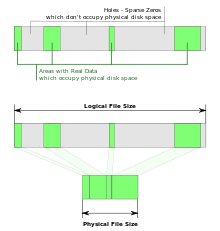
The location on the disk of two identical files:
top and middle - an ordinary file;
bottom - sparse file;
green areas - data;
gray areas - holes
A sparse file is a file in which sequences of zero bytes [1] are replaced with information about these sequences (list of holes).
A hole is a sequence of zero bytes inside a file that is not written to disk . Information about holes (the offset from the beginning of the file in bytes and the number of bytes) is stored in the FS metadata.
Advantages and disadvantages
Benefits:
- disk space saving. Using sparse files is considered one of the ways to compress data at the file system level;
- lack of time spent on writing zero bytes;
- extending the life of storage devices .
Disadvantages:
- the overhead of working with a list of holes;
- file fragmentation with frequent data recording in holes;
- inability to write data to holes in the absence of free disk space;
- the inability to use other indicators of holes, except for zero bytes.
Support
To implement sparse file support, you need:
- the ability to record metadata in the FS;
- support from system and application software.
The following file systems support sparse files: BTRFS , NILFS , ZFS , NTFS [2] , ext2 , ext3 , ext4 , XFS , JFS , ReiserFS , Reiser4 , UFS , Rock Ridge , UDF , ReFS .
The following software supports working with sparse files:
- uTorrent - a client of a file-sharing network working using the BitTorrent protocol ;
- eMule - eDonkey2000 file-sharing network client ;
- Far manager - file manager ;
- VirtualBox - a virtual machine ;
- and other.
Application
Sparse files are used to store containers , for example:
- disk images of virtual machines ;
- backup copies of disks and / or partitions created by special. BY.
Commands
Commands for working with sparse files.
Linux :
- creating a sparse file of 200 GB in size:
  dd if = / dev / zero of = ./sparse-file bs = 1 count = 0 seek = 200G
 # or
 truncate -s200G ./sparse-file
- converting a regular file to sparse (search for holes and record their location (offsets and lengths) into file metadata):
cp --sparse = always ./simple-file ./sparse-file
- saving a copy of the disk to a sparse file:
ddrescue --sparse / dev / sdb ./sparse-file ./history.log
Windows :
- creation of a (non-sparse) file of 200 GB in size ( 214 748 364 800 bytes ) (the size is specified in bytes):
fsutil file createnew some-file 214748364800
- setting the “sparse” flag (the search for holes inside the file is not performed):
fsutil sparse setflag some-file
- removal of the "sparse" flag:
fsutil sparse setflag some-file 0
- getting the value of the "sparse" flag:
fsutil sparse queryflag some-file
- marking the file area as holes (offset and length are specified in bytes):
fsutil sparse setrange some-file 0 214748364800
Features
- When reading from a hole, zero bytes are returned; no access to the disk occurs (it is assumed that the location maps of the regions have already been read from the disk from the file metadata and are in memory).
- When writing to a hole, the algorithm for searching for free space (free blocks) on the disk is launched. If blocks are found, data will be recorded. Often, found blocks are located on a disk far from blocks with already recorded file contents; this leads to fragmentation of the FS. If the disk space runs out, the algorithm will not find anything and the recording will not be completed ( write () will report a lack of free space, and if the file was used with mmap () , a segmentation fault will occur).
- Writing to an arbitrary place of a sparse file, as a rule, leads to a large fragmentation of the FS.
- Sparse files are not always correctly copied; when copying a file, instead of information about holes, zero bytes can be written to the disk. For Linux, proper copying is done with the cp command with the --sparse switch . There are two ways to implement correct copying: 1) search for areas filled with zero bytes (holes), and execute seek () (instead of writing zeros using write () ); 2) get a map of the location of the file on disk using fibmap () .
- To mark an arbitrary region of a file as a hole, the fallocate () system call with the punch hole [3] flag allows you to mark a hole. A system call will not only free up disk space, but also execute the TRIM command on SSD disks for blocks of the specified area.
- Since addressing in most FS is carried out using blocks [4] , the displacement and size of holes cannot be arbitrary, but must be a multiple of the size of the block (aligned with the size of the block). The block size is constant for one partition . Thus, you cannot make a “hole” in a couple of bytes; in such an attempt, the FS driver will write zero bytes to the disk.
- Utilities for displaying the file size usually display the actual file size (in bytes) and the size occupied by the file on the disk (in FS blocks [4] or bytes). A sparse file may take up less disk space.
- Note that the fallocate () system call with flag 0 selects blocks for the file and marks them as "filled with zero bytes." This allows you to instantly create a large file without writing zero bytes to disk. The difference from sparse files is the reservation of blocks; blocks for the file are allocated immediately; when writing to the block, the flag “filled with zero bytes” is removed; if the disk runs out of space, an error will not occur when writing to an area containing zero bytes. The TRIM command on SSDs is also called for this case.
Notes
- ↑ Zero byte - a byte , all bits of which are set to zero (0, NUL or '\ 0' in C ).
- ↑ Sparse files in NTFS
- ↑ FALLOC_FL_PUNCH_HOLE. Cm.
man 2 fallocate - ↑ 1 2 For different FS, “block” is called differently: “cluster” ( English cluster ) in NTFS , “block” ( English block ) in ext4 .