


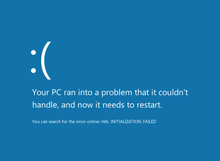



Blue Screen of Death ( English Blue Screen of Death, Blue Screen of Doom, BSoD ) - the name of the critical system error message in Microsoft Windows operating systems. There are several types of BSoD messages: for Windows 9x , Windows NT and Windows CE .
The blue screen of death, as such, first appeared in Windows 95, its prerequisites are found in Windows 3.x systems.
Content
In different systems
Windows 3.x
In Windows 3.x, with a global failure, the system forcedly shut down, in which case either a black screen or an MS-DOS environment appeared.
If you press the CTRL + ALT + DEL key combination, a blue screen appeared that served as a task manager: if you press any key, the active application will be forcibly closed, and pressing CTRL + ALT + DEL again will restart the computer.
If it was necessary to allow access to the physical equipment, a blue screen also appeared asking for permission from the user.
Windows 9x
The design of the "blue screen" in Windows 9x compared with Windows 3.x has not changed.
In Windows 9x, the blue screen of death appeared quite often due to the instability of the systems of this line. The user was asked to restart the computer or continue working by pressing any key (in fact, it rarely worked, later such a line was removed from the BSoD text). In Windows Me, there have even been cases of so-called. “Time-BSoD” - serious system failures occurred at a certain interval.
The blue screen of death in Windows 95 and 98 appeared at the moment when the system tried to access the file c: \ con \ con or c: \ aux \ aux. On March 16, 2000, an update was released to fix this problem.
On April 20, 1998, when Bill Gates presented a Windows 98 presentation at COMDEX, his assistant connected a scanner to the demo computer to demonstrate the capabilities of the Plug and Play system. After connecting the device, a fatal error occurred. At that moment, Gates joked off: "It must be that is why we are not selling Windows 98 yet."
Windows NT
For these versions of Windows, a blue screen of death appears when a fatal error occurs in the kernel or driver code running in kernel mode or in system-critical processes that run in user mode ( winlogon.exe , csrss.exe ). The only possible action in this case is to restart the computer (while the user loses all unsaved data). By default, this reboot occurs automatically. After that, the operating system creates a record in the system log with the parameters of the error that occurred. If creation of memory dumps is enabled in the OS settings, the path to the file with the .dmp extension will be specified in the system log. It can be used by software developers and drivers to more accurately determine the causes of the error (using the Microsoft Debugging Tools ).
Within the Windows Resource Kit, the blue screens of death are called stop errors ( eng. Stop error ); in the SDK and DDK, they are called bug check screens or Stop screens .
When the BSOD exits, all interruptions are disabled in the system, the screen is translated into text mode, the user is out of the application layer, so no application window can be (which is sometimes used by viruses ).
Screen text content:
- error code (Stop code) and its symbolic name (for example,
0x0000001E,KMODE_EXCEPTION_NOT_HANDLED) - 4 parameters explaining the error, intended for debugging software (the value of the parameters depends on the error code). You can also get the most information, explaining the error, using the command line and the
net helpmsg. - the address of the location of the error (if it is possible to specify it)
- the name of the driver in which the error occurred (if it is possible to specify it)
The NT kernel provides KeBugCheck and KeBugCheckEx functions, which show a blue screen of death, stopping the system. Both functions accept the Stop code, the second also allows you to specify the above 4 additional parameters.
Design
In Windows NT 3.1 - 4.0, a lot of drivers were displayed on a blue screen that were used at the time of the fatal error. An error code was displayed at the top.
In Windows 2000, the screen text has undergone significant changes: the list of drivers has been removed (Windows 2000 was calculated on an ordinary user), recommendations have been made to the text for users. In Windows XP, the error code was moved down, the Lucida Console font was used, in later versions the Consolas font was used.
The new version of the screen with an error was noticed by the developer after previewing Windows 8 , released in September 2012. Instead of displaying detailed technical information about the error, a simplified approach for users is used, which displays a sad smiley and a message about the need to restart the computer. This was done out of consideration that many users do not go into the description of the error, but simply press the Power Off or Reset buttons, trying to fix the problem. The very reason for this problem is displayed below. Also this kind of error screen may not be so scary for people who see the “screen of death”.
In one of the updates for Windows 10, a QR code was added to the screen, which, when scanned, sent it to Microsoft with error information. In the pre-builds of Windows 10, instead of the blue "green screen of death" appears.
Manual call
The operating systems of the Windows NT family, starting with Windows 2000 , allow the user to manually trigger a blue screen of death. To enable this option, the user must perform the following steps [1] :
- Start Registry Editor (using the
regedit). - Open the registry key
HKEY_LOCAL_MACHINE\SYSTEM\CurrentControlSet\Services\kbdhid\Parameters(parameters of USB keyboards). - Create DWORD-parameter
CrashOnCtrlScrollwith the value1. - Open the registry key
HKEY_LOCAL_MACHINE\SYSTEM\CurrentControlSet\Services\i8042prt\Parameters(parameters of keyboards connected via PS / 2 connector). - Create DWORD-parameter
CrashOnCtrlScrollwith the value1. - Close the registry editor and restart the computer.
Next, by double-pressing SCROLL LOCK while holding RCTRL, the system will display a “blue screen of death” and will reboot by recording disk caches . This option can be useful, for example, to receive a dump of computer memory at a given moment or for an emergency stop of a computer, similar to the Reset button. Sometimes it is used to resolve real operating system problems, since the disk buffers stored in memory are written.
Also, the "blue screen of death" can be called by completing the critical system process csrss.exe or wininit.exe, or using the special program NotMyFault .
In other systems
- ReactOS also uses the blue screen of death.
- The blue screen of death is in Symbian OS 8.1, which appears when you start the program from a foreign memory card.
Red screen of death
In 2000, the BBSpot prediction appeared on the comic site that in 2016 Microsoft would improve the blue screen of death by turning it red. [2]
In 2004, there were reports that the Windows Vista beta ( Windows Longhorn ) beta loader reports critical errors on a red background. [3]
Also, the red screen of death was present in Windows 98 . He reported a critical ACPI error.
Green screen of death
In late 2016, Microsoft replaced the blue screen of death with green in the pre-builds of Windows 10 . In stable versions of the OS remained blue screen. [4] [5] [6]
Gallery
Prototype blue screen of death in Windows 1.0
The blue screen of death serves as a task manager in Windows 3.1 . Spanish version
The blue screen of death of Windows 2000 on the monitor at the 42nd Street metro station, New York
Blue screen of death in Windows XP . Norwegian version
Blue screen of death in Windows XP created using a manual call.
See also
- Death screen
- Error code
- Kernel panic
- Guru meditation
- Chroma Key
- BlueScreenView
- NotMyFault
Notes
- ↑ The Windows system feature allows you to create a memory dump file using the keyboard
- ↑ Microsoft: The Next 25 Years (English) (21 April 2000). The appeal date is February 13, 2016.
- ↑ Jo Best. Red screen of death? (eng.) CNET (11 May 2005). The appeal date is February 13, 2016. Archived on June 25, 2012.
- ↑ Windows 10 has a green screen of death . www.oszone.net The appeal date is October 12, 2017.
- ↑ A “green screen of death” appeared in Windows . The appeal date is October 12, 2017.
- ↑ “Blue screen of death” Windows 10 turned green (Russian) , 3DNews - Daily Digital Digest . The appeal date is October 12, 2017.
Links
- Raymond Chen's blog , Microsoft History, much on the topic of the article (eng.)
- Bug Check Code Reference (English)
- Error codes of operating systems Windows XP, Windows Vista, Windows 7 (rus.)
- Public Computer Errors (eng.)
- Analysis of the causes of BSOD using Debugging Tools for Windows (rus.)