The ZX Spectrum home computer has more limited graphics capabilities compared to other microcomputers of the same time (such as the Commodore 64 ), mainly due to the lack of a separate graphics chip. However, over the years of commercial game release and then demo scene activity, several ways have been developed to improve the graphics capabilities of the ZX Spectrum.
Content
Palette
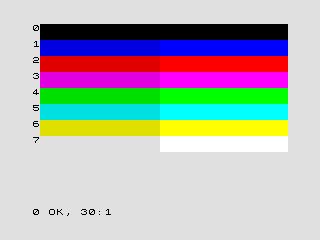
The graphics modes of the ZX Spectrum and its compatible computers are based on the concept of a 4-bit RGBI palette . It can be considered as a 3-bit palette plus a bit of gradation of brightness. Black brightness was not present in all ZX Spectrum models and ZX Spectrum emulators (for example, in some emulators (EmuZWin, ZX Fuse) it is possible to adjust the desired level of normal and bright colors, including black (also not all emulators have bright blue color) ) Also on different models there were two types of palettes: tied to black and white colors and not tied to them.
| Brightness 0 | Brightness 1 | room | Binary code | Russian name | English name |
|---|---|---|---|---|---|
| 0 | 000 | The black | Black | ||
| one | 001 | Blue | Blue | ||
| 2 | 010 | Red | Red | ||
| 3 | 011 | Purple | Magenta | ||
| four | 100 | Green | Green | ||
| five | 101 | Blue | Cyan | ||
| 6 | 110 | Yellow | Yellow | ||
| 7 | 111 | White | White |
Standard Mode
The only full-time video mode of the original ZX Spectrum is a graphic mode with a resolution of 256 × 192 pixels, limited options for setting colors and a border. Only one video page is available, located in the main memory of the computer at a fixed address. Information about the color is set by attributes, one byte of attributes per familiarity of 8 × 8 pixels. Due to this way of setting the color, such an effect as an attribute conflict often manifested itself.
The displayed screen does not occupy the entire television raster, leaving free space at the edges - a border . In the border area, it is impossible to display graphics, only changing its color (you can get simple drawings by changing the color of the border many times per frame). Unlike the main area of the screen, the brightness cannot be used on the curb.
The pixel area occupies the address space # 4000 - # 57FF, and the attribute area # 5800 - # 5AFF. In turn, the pixel area is divided into 3 parts of 64 lines. The structure of each third is the same:
The lines are displayed in the following order (counting from zero):
0, 8, 16, 24, 32, 40, 48, 56,
1, 9, 17, 25, 33, 41, 49, 57,
...
7, 15, 23, 31, 39, 47, 55, 63
Each line consists of 32 consecutive bytes, each bit of which represents one point on the screen.
This screen structure is made specifically for the convenience of calculating the address of a color attribute for the chosen familiarity, because one attribute occupies the whole familiarity, all 8 lines in it.
In ZX Spectrum 128K, the standard video mode was supplemented with the ability to use a second screen area - the so-called shadow screen . The main area is located in the 5th bank of RAM, the additional - in the 7th bank.
Multicolor
Multicolor ( English multicolor ) - a software trick that allows you to bypass the limitation of the standard ZX Spectrum video mode on the number of colors displayed simultaneously in one familiarity. Relatively speaking, multicolor allows you to reduce the height of familiarity, up to one point (its own attribute for blocks of pixels 8 × 1, 8 × 2, 8 × 4, etc.).
The logic of the video controller is such that when the scan beam passes through each line of the raster in the main area of the screen, the familiarity attributes are read. That is, when constructing a raster, the attribute of each screen familiarity is read by the video controller eight times - by the number of lines of pixels in the familiarity. If the attributes are changed between the passes of the beam, this will lead to the use of new values for the current displayed line. Thus, by changing the contents of the attribute area of the screen in time, you can set colors for 8 × 1 dots strips instead of the usual 8 × 8 blocks.
Multicolor 8x4 can also be implemented using the ZX Spectrum 128K shadow screen - all the attributes of the normal and shadow screen can be set at the beginning of the frame, then during the passage of the beam along the raster every 4 lines you need to switch the visible screen.
Hardware Multicolor
Hardware multicolor ( Eng. Hardware multicolor or Hicolour ) - the conditional name of the additional video mode for ZX Spectrum. Its capabilities are similar to the software 8 × 1 multicolor, but implemented in hardware, which allows you to use processor resources for other tasks.
In this video mode, the attribute area is transferred to the address space # 6000 - # 77FF parallel to the screen area located at addresses # 4000 - # 57FF.
The video mode is natively present in Timex Computer 2048 and Timex Sinclair 2068 computers, and is also implemented in the form of improvements for Pentagon and other domestic computers.
GigaScreen
GigaScreen - a mode in which two specially prepared images often replace each other on the screen. Due to the inertia of the perception of the image by the eye, the two images merge, and thereby, due to the imposition of colors, the palette is expanded to 102 colors.
For ZX Spectrum 48K, the use of full-screen Gigasreen is possible by updating the attribute part of the screen memory area. On the ZX Spectrum 128K, a shadow screen is used for the same purpose. Hardware mode is not implemented.
GigaScreen Hardware
Hardware GigaScreen - hardware implementation of video mode, designed to reduce the flickering of the resulting image on the screen, caused by the fact that both images replace each other in frames.
There are at least two modifications to the video mode:
1) Both images replace each other in rows. In this case, the phase switching of the images changes from frame to frame. In practice, the flicker of the image is indeed much less, but banding of the image appears;
2) Both images replace each other according to familiarity (every 8 points). In this case, the switching phase changes from row to row and from frame to frame.
MultiGigaScreen
MultiGigaScreen - a mode that combines the capabilities of GigaScreen and multicolor. Thus, for attributes 8 × 1, 8 × 2, 8 × 4, etc., it becomes possible to set up to 4 colors from the palette to 102 colors.
Tricolor
Tricolor is a software-implemented video mode in which each point can be assigned one of 8 colors, the brightness is set by familiarity. The idea is similar to Gigascreen, but it uses a resource-intensive frame transfer from memory, compatible with the 48kB spec. Three frames in succession - for red, green and blue RGB. The flicker frequency is 16.6 Hz, which is already very noticeable visually.
Flash-color
Flash color - a mode based on the supply of a frequency of 7 MHz with a duty cycle of 75% instead of 1.5 Hz for a flash signal. In this case, when each pixel is displayed on the screen, the color is ink, then the color paper. Valid in familiarity for which the flicker bit is set in the attribute byte. By hardware refinement, the background is made black, and the remaining 7 bits are used for the color of the ink, providing 128 colors. 75% duty cycle for a 7 MHz signal is needed in order to obtain additional color shades by changing the color of ink and paper in places.
512 × 192
Monochrome high-resolution mode, implemented in computers Timex Sinclair 2068 , Bytes , Pentagon, and some other clones. It is mainly used for 64 × 24 and 80 × 24 text modes, in particular, for working in the CP / M operating system.
In this video mode, every first byte of the screen area is output from its old address space # 4000 - # 57FF, and every second byte from the parallel area # 6000 - # 77FF.
The SAM Coupé computer implements Mode 3 mode, 512 × 192 pixels, 4 colors per point from the 128-color palette. This mode uses 6-pixel wide characters to get 85 characters per line.
There is another development of a color version of the 512 × 192 video mode for domestic ZX-Spectrum computers with turbocharged RAM. In this embodiment, similarly to pixels, the standard color attribute for each first 8 × 8 familiarity is in its old address space # 5800 - # 5AFF, and for every second - in the parallel area # 7800 - # 7AFF. In addition, this development includes a multi-color version of the 512 × 192 video mode, in which color attributes are set for a block of 8 × 1 pixels. In this version, both attribute areas are transferred to the 4th page of RAM and occupy addresses # C000 - # D7FF for even familiarities, and addresses # E000 - # F7FF for odd ones.
384 × 304
Hardware modification for Pentagon , which implements an additional video mode with a resolution of 384 × 304 pixels [1] . At the same time, the image scale does not change, additional information is displayed in the area where the border is displayed in the standard video mode. Restrictions on the use of color are similar to standard video mode.
16Colors
Hardware refinement, in which each point is displayed in its own color. In this video mode, one byte describes two neighboring pixels as follows:
0th - 2nd bits - B, R and G colors of the first pixel;
3rd - 5th bits - B, R and G colors of the second pixel;
6th bit - brightness of the first pixel;
7th bit - brightness of the second pixel.
Accordingly, to output 8 pixels to the screen, the ZX-Spectrum video controller must read 4 bytes from 4 different RAM screen areas from memory. Because Since the standard clock frequency of RAM in the ZX-Spectrum is equal to the processor clock frequency of 3.5 MHz, then during the output of 8 pixels RAM provides only 4 access cycles. Thus, the processor no longer has free cycles, therefore, it completely stops for the time the screen area is displayed, and continues to work only during the output of the border area and the reverse course of the sweeps.
So, every 8 pixels are output from the following 4 screen areas in the following order:
1) - addresses # C000 - # D7FF of the 4th page;
2) - addresses # C000 - # D7FF of the 5th page (# 4000 - # 57FF);
3) - addresses # E000 - # F7FF of the 4th page;
4) - addresses # E000 - # F7FF of the 5th page (# 6000 - # 77FF).
There is a modification of the video mode `` 16Colors '' for ZX-Spectrum computers with turbocharged memory operating at a frequency of 7 MHz. In such computers, at the same time, RAM provides 8 access cycles, which is enough for both video mode and a turbocharged processor. In this embodiment, the processor does not stop while the screen area is being displayed.
ULAplus
ULAplus , ULA64 - a project to replace the original ULA ZX Spectrum 48K chip. The new chip, which is compatible with the original, allows you to use on the screen up to 64 colors from a palette of 256 colors. The idea is that the brightness and flicker bits select one of four palettes containing 8 INK and PAPER colors, set programmatically [2] [3] . The chip was never released, but support for the corresponding mode is present in several emulators.
Notes
- ↑ Contact v2.06 - 384 × 304 revision scheme and programming, article from AlCo News # 32 (2004)
- ↑ ZX Spectrum 64 Color Mode - Scratchpad Wiki Labs
- ↑ ULAplus