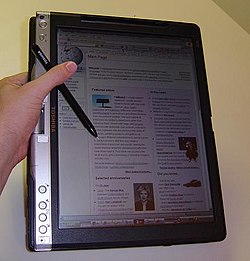
A tablet personal computer ( tablet PC , tablet PC ) is a full-sized IBM PC-compatible laptop ( personal computer ) equipped with a touch screen that allows you to work with the stylus or fingers, both with or without a keyboard and mouse .
Content
- 1 Key Features
- 2 Design
- 3 Tablet PCs vs. laptops
- 4 Tablet PCs versus Internet tablets
- 5 Examples
- 6 See also
- 7 notes
- 8 References
Key Features
This variety of personal computers (PCs) appeared on the market after the presentation of the Microsoft Tablet PC hardware and software platform developed by Microsoft and presented on November 7, 2002 . Until this time, devices of this type were used in narrower markets - in production, in medicine and in public institutions.
The main distinguishing feature of this PC family is the hardware compatibility with IBM PC- computers and the full-fledged operating systems (OS) installed on them, used on desktop computers and laptops , such as:
- Microsoft Windows NT family ( Windows XP Tablet PC Edition , Windows 7 , Windows 8 , Windows 10 );
- Apple Mac OS X
- Linux (full desktop build of one of the variants of this OS).
The installed desktop OS provides the user with the ability to use without limitation the full breadth of software available on the desktop computer.
The vast majority of tablet PCs are running operating systems of the Microsoft Windows NT family ( Windows XP Tablet PC Edition , Windows 7 ). But at the same time, there are tablet PCs running Apple Mac OS X [1] (for example, Axiotron Modbook ) and various Linux variants.
The user can enter text using the built-in handwriting recognition program, on-screen ( virtual ) keyboard, speech recognition or physical keyboard .
Design
According to the design, tablet PCs are divided into:
- actually tablet devices without a full keyboard.
- tablet laptops , also called transformers , because of their ability to transform: the device can look like a laptop, the screen can be rotated 180 ° around the axis and put on the keyboard - the laptop will look like a tablet.
- tablet netbooks , similar to laptops, convertible netbooks with a rotary screen. In addition, these include Asus’s new dual-screen multi-touch netbook, a concept called Dual Panel was presented at CeBIT 2009. And of course, the multi-touch “tablets” concepts from Microsoft and Apple.
- Slate PC is a compact version of a tablet PC with a screen size of 7-11 inches, designed to compete with Internet tablets . It has some differences in the interface, as it is designed to control your fingers using the touch screen and use multi-touch gestures. Only a virtual keyboard is used to enter texts, although theoretically, using the bluetooth interface, an external physical keyboard can be connected to the device.
- UMPC is a compact version of a tablet computer with a screen diagonal of 4-7 inches, designed to replace the PDA . It has some design differences, as well as some differences in the interface, as it is designed specifically for finger control. May have a built-in keyboard, usually non-standard.
In addition, tablet computers are divided into two classes according to the principle of the tablet:
- The electromagnetic principle of the tablet. The most numerous class, allows you to work with the tablet only with the help of a special stylus . The advantages of this approach are the high accuracy of text recognition, the accuracy of determining the force of pressing, as well as the lack of reaction to accidental pressing with a hand or fingers when writing. Typically, Wacom technology is used.
- Touch sensitive tablet. The most numerous class to date. The plus is that such a tablet can be controlled without using a stylus, which can be convenient in some situations. In addition, this approach allows you to create interfaces that are specially designed to control your fingers, including recognition of multiple touches and gestures. This class includes UMPC. The disadvantages are less accuracy, lower quality of letter recognition, the negative impact of the tablet on the quality and brightness of the screen, as well as the possibility of accidental clicks when writing ( more about touch screens ).
Tablet PCs vs. laptops
- Benefits
- With a stylus, they are very convenient for designers ;
- It is convenient to read electronic books from it using the vertical orientation of the screen.
- It is convenient to work on a folded tablet PC lying on a table without interrupting the line of sight (for example, at a business meeting).
- A tablet laptop is especially convenient as a means of reviewing documents, allowing the pen to make notes in the margins or directly in the text.
- Tablet PCs are lighter and smaller (in particular in thickness) of laptops and netbooks, which allows owners to always carry them with them.
disadvantages
- Mounting the screen of a tablet laptop is less reliable, since the screen rests on one rotating loop - unlike a regular laptop, the screen of which rests on two loops. Tablet PCs that can work without a keyboard or have no keyboard at all are deprived of this drawback.
- Special touch-sensitive coating on the screen reduces viewing angles and brightness.
- A tablet laptop is about $ 300 more expensive than a regular laptop with the same specifications, although it is expected that this difference should decrease to $ 75 over time.
- As a rule, the accuracy of touching with fingers is extremely low (although high-quality touch panels are installed in the products of a number of manufacturers, where this drawback is practically absent). In modern models, positioning accuracy is more affected by the relatively large thickness of the fingers (respectively, and the area of touch) than the quality of touch panels.
- The absence of a hardware keyboard on most tablet PCs, which reduces the speed and ease of typing, and also reduces the applicability of tablet PCs for games.
Tablet PCs vs. Internet tablets
Benefits
- Full software compatibility with desktop PCs, which allows people of various professions that they use on ordinary PCs to use specific powerful software products.
- The performance of the x86 hardware platform, in particular, the new intel Bay Trail-T architecture, surpasses that of the latest ARM solutions.
- A full-fledged USB host with many drivers for Windows for any type of connected device.
- Prices for tablet PCs from Chinese manufacturers start at $ 75 (examples: Pipo W7, Cube U67GT, Onda V819W). As a rule, Android-based Internet tablets for this price do not have enough performance or functionality for typical tablet use situations.
- The presence of a BIOS that allows you to install another OS without risk of damaging the information in the device’s ROM.
disadvantages
- x86 processors, allowing the device to be IBM PC-compatible , are generally less energy efficient than the ARM processors used in Internet tablets. The new intel Bay Trail-T platform allowed tablet PCs based on it to compete with ARM products in terms of energy consumption by reducing energy consumption to ~ 2 watts [2] .
- The graphical interface of the preinstalled version of Windows is less convenient for touch control than the OS interfaces in Internet tablets due to the smaller size of the on-screen controls.
Examples
The most popular tablets are Acer , Fujitsu , Microsoft, and Toshiba . The first of the tablet multi-touch laptops are HP / Compaq and Dell .
See also
- Tablet PC
- Internet tablet
- Tablet netbook
- E-book (device)
- Touch screen
- Multi touch